

BACtrack S80 Pro Operating Instructions

Below are basic operation guidelines for the BACtrack S80 Pro Breathalyzer. For more detailed instructions and explanations, please read the BACtrack S80 Pro Breathalyzer Owner’s Manual.
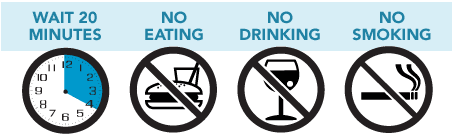
IMPORTANT: Users must wait 20 minutes after eating, drinking, or smoking before blowing into the S80 Pro Breathalyzer. Failure to wait 20 minutes can provide inaccurate test results and may damage the sensor.
-
Step 1
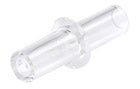
Insert a mouthpiece into the slot. The side with the wider diameter slides into the slot first. It is recommended to insert a fresh mouthpiece before each test.
-
Step 2
Press the Start button. The S80 Pro will quickly display the total number of tests performed, and then begin a countdown.
-
Step 3
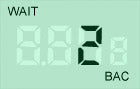
When the countdown approaches 2, begin to inhale a deep breath.
-
Step 4
When the countdown reaches zero, "START" will flash and the screen will display three lines. Blow through the mouthpiece firmly and continuously for five seconds or until there is a double beep sound.
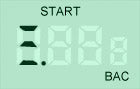
-
Step 5
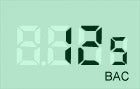
Once the sensor has analyzed the breath sample, the estimated BAC value is displayed.





The displayed result is an estimate of the test subject’s BAC.
Powering Off
Error Notifications
-
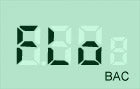
If a user does not blow a sufficient breath sample, the LCD will display “FLO.” Press Start to restart the countdown cycle and retest. Be sure to blow firmly and continuously for five full seconds while testing.
-
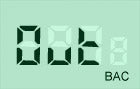
If there is no breath sample blown within 15 seconds, the LCD will display “Out.” Press Start to restart the countdown cycle and retest.
-

If the unit is powered on outside of the acceptable temperature range (0-40 °C or 32-104 °F), this image will display and testing cannot be performed.
-
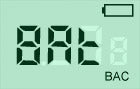 If the battery indicator display is empty, install two new alkaline batteries.



 If the battery indicator display is empty, install two new alkaline batteries.
Advanced Menu Options
-
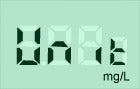 Units of Measure - By default, the BACtrack will display test results in %BAC, which is the standard in North America and in many other regions. To change to a different unit of measure, press the Start button. You can select Promille (0/00) or mg/L as alternate units of measure.
 -
 Audible Warnings - By default, the S80 Pro does not sound an audible warning after a specific %BAC result. To set an audible warning at or above a specific %BAC threshold, press Start button to cycle through %BAC values.
 -
 Blow Time - The S80 Pro defaults to the longest blow time available with the unit, which is five seconds. This provides a deep lung air sample and the most accurate test result. To select a shorter blow time, press Start.
 -
 Flow Detection Settings - Use this option to adjust how hard a user is required to blow. Press Start to toggle between settings.
 -
 This signifies standard level flow detection.
 -
 This screen signifies low flow detection, and would detect a gentler breath.
 -
 When testing in USER mode, the operator must press Start during a breath sample to activate the pump and perform a test.
 Units of Measure - By default, the BACtrack will display test results in %BAC, which is the standard in North America and in many other regions. To change to a different unit of measure, press the Start button. You can select Promille (0/00) or mg/L as alternate units of measure.
 Audible Warnings - By default, the S80 Pro does not sound an audible warning after a specific %BAC result. To set an audible warning at or above a specific %BAC threshold, press Start button to cycle through %BAC values.
 Blow Time - The S80 Pro defaults to the longest blow time available with the unit, which is five seconds. This provides a deep lung air sample and the most accurate test result. To select a shorter blow time, press Start.
  Flow Detection Settings - Use this option to adjust how hard a user is required to blow. Press Start to toggle between settings.
  When testing in USER mode, the operator must press Start during a breath sample to activate the pump and perform a test.